
Random Letter Games for Kids, Classrooms & Fun Activities
Random letter games are one of the most engaging teaching and entertainment tools for all ages. In language learning, random letters help build vocabulary, improve quick thinking, and make practice feel like play.
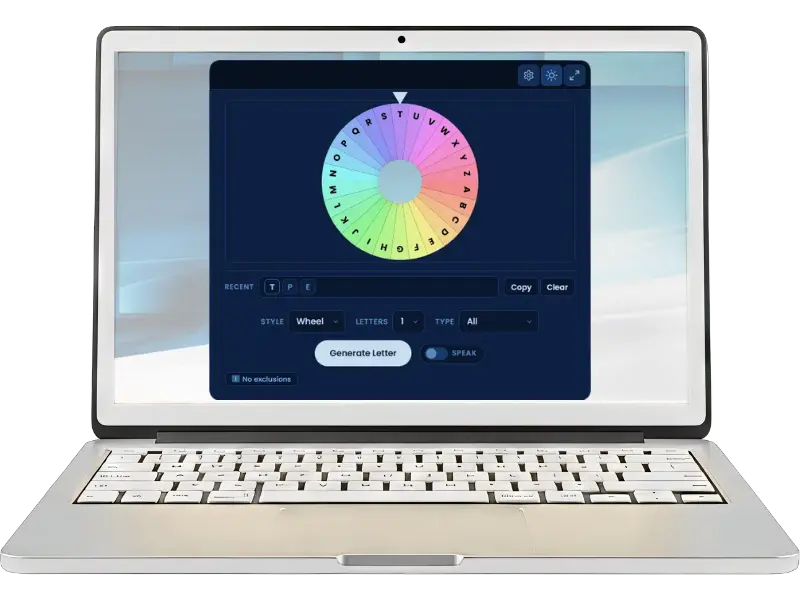
With the updated Random Letter Generator tool, you can now generate up to 5 letters in one go, filter by vowels or consonants, exclude specific letters, and announce results aloud — making it even more flexible for group games and classroom use. Use our Random Letter Generator tool to instantly pick letters for your games.
Why Use Random Letter Games?
Here are some of the reasons:
- Keeps the participants engaged
- Helps activate our brain and quick thinking
- Improve the vocabulary of the young learners
- Ideal for parties, learning activities, and classroom games
- Works well for all age groups

Easy Random Letter Games You Can Play
There are dozens of games based on random letters that you can play. Some of the interesting and widely played games are listed below:
Word Chain Game
Highlights:
- The facilitator starts the game by choosing a random letter
- Each player says a word starting with this letter
- The players who continue making words progress in the game
Alphabet Category Game
Highlights:
- In this game, a letter is randomly selected
- The players are challenged to create a word from categories like fruit, animal, city, and many more
- There is a time limit for the word to be announced
- Some of the famous games in this type include: Scattergories or Tapple
Classroom Quick Quiz
Highlights:
- Before the game starts, the teacher prepares a list of questions starting with every letter
- It can be played by individual students or in groups as a team
- The teacher picks a random letter
- Whoever knows the answer presses a buzzer
- The student or the group has to respond quickly and give a correct answer within the given time to score a point
- The individual or group with the highest score wins the game
Playing a Song Game
Highlights:
- A random letter is selected by the coordinator
- The players press a buzzer or bell, indicating their readiness to attempt
- The player gets a point upon success
- The player with the most points wins the game
Speed Challenge Game
Highlights:
- A random letter is chosen
- Whoever can say 5 words fastest with the letter wins

How to Use a Random Letter Generator for Games
Simple steps:
- Connect the device to a projector or large screen so all players can see the result.
- Set the Letters count (1–5) depending on your game. Most word games use 1 letter at a time.
- Choose the Style — Spinner for speed, Wheel for a dramatic spinning reveal.
- Select a Type if needed — Vowels Only or Consonants Only for specific game modes.
- Enable Speak so the selected letter is announced aloud — no one misses it.
- Press Generate Letter and start the round.
- Use History to review the last 10 results without losing track.
- Repeat for each round.
Best Situations to Use These Games
The availability of the random letter tool on multiple devices makes it extremely convenient for players to use it in any situation or place. Some of the most suitable situations are:
- Timer usage with a time limit
- Rewards for the winners and runner-ups
- Enablement of the Speak feature for a final letter announcement, making everyone aware of the selection at once
Tips to Make Letter Games More Fun
The games can be made more interesting and challenging by incorporating:
- Timer usage with a time limit
- Rewards for the winners and runner-ups
- Enablement of the Speak feature for a final letter announcement, making everyone aware of the selection at once